
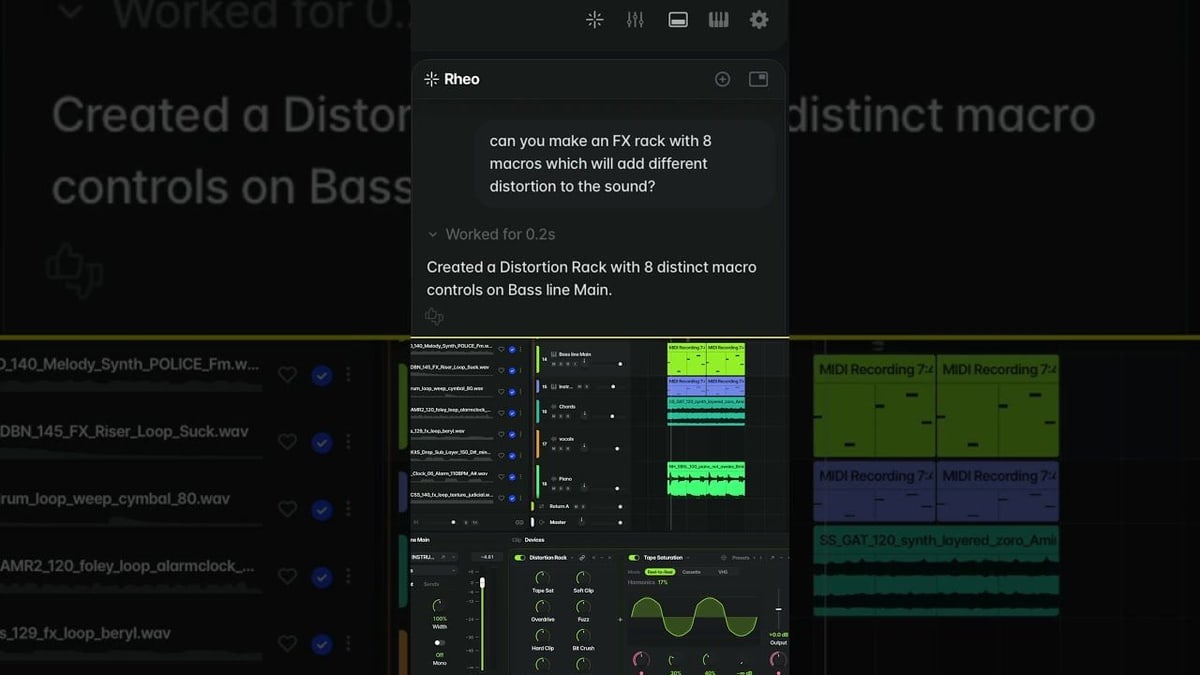
Splice, a company whose library of millions of recorded sounds is used by music makers every day, released Splice Create on Nov. 5. It is a free app for making songs on a Mac, still in a test version, with an AI helper built in. It is a full studio program of the kind producers use to record, arrange and mix music. Splice says it is built to teach as you go, whether you are new to making music or coming from another studio program.
Instead of hunting through menus, people can type or say what they want, such as grouping the drums or adding an effect, and the helper, which Splice calls Rheo, does it for them. Splice's help pages say the app's AI can add tracks, set a song's speed and key, find sounds that fit, write a drum pattern or a bass line, and split a recording into its vocals, drums, bass and other instruments. A mode called Point moves a pointer across the screen and shows people each step of a technique, so they learn where things are instead of only getting the result.
Splice says many music tools either make the song for you or assume you already know how, and that Create helps people learn to make the music they want while they call the shots. The company says its helper does not make new sounds. It picks recordings from Splice's library that were made by people, or writes the notes for a part, and everything it adds stays editable, with one undo to take back a whole request. Another Splice help page says the app can also make variations of a clip you choose, built from that clip.
Splice already used AI in a smaller way: its Stacks feature picks loops from its library that sound good together. According to a news report, Create began as that loop-matching tool and has now grown into a full studio app. Splice says it trains its AI only on sounds from its own library that it has licensed, and that the creators are paid when those sounds are used. It says it does not train on music people make in the app or upload to it.
The app is free to download with a Splice account, with no time limit for now. But Splice's help pages say free users get only a starter allowance of the helper, which Splice says, as a rough guide, is enough to try it and make one song, and the helper stops working when it runs out. They also say free users can't export songs or license sounds from Splice's library, though the product page lists exporting in the free plan. Create Pro, at an introductory $9.99 a month, adds a monthly allowance, and more can be bought. A request uses more or less of it depending on how complex it is. Splice has not said what Create Pro will cost after the introductory price, and the app's Windows and web versions are only described as coming soon.